Skip to content
Free

Screen-Off Routine Kit. No card required.

AfterScreen

Free Screen-Off Routine Kit · for parents of kids 2–8

When the screen turns off, know exactly what to say and what happens next.

A simple screen-off routine for parents of kids ages 2–8, with ready-to-use words, quick activity ideas, and a backup plan for when the first idea gets a “no.”

4 pages · 8 activities · 5 scripts · 1 reusable after-screen plan

Send Me the Free Kit

Free · No card required · Instant access · Printable + mobile-friendly

Use it tonight. No parenting lecture required.

  • The Screen-Off Routine — page 1
  • Quick Choice Board — page 2
  • 5 screen-off scripts — page 3
  • My after-screen plan — page 4

All 4 pages, exactly as you receive them · See inside

  • Free. No card required.
  • Instant access — it lands in your inbox in about a minute.
  • Printable, and easy to read on a phone.
  • No subscription. Unsubscribe from tips any time.
“I wish I had this earlier. Not because we needed fewer screens, but because we needed a better way to move on from them.”
Early-access customer· Name withheld for privacy

The screen going off isn’t always the problem. The gap afterwards is.

“One more!”

The screen ends and the negotiation starts in the same second — before you have had a chance to say anything.

“I’m bored.”

You are making dinner and suddenly need to become an entertainment director.

Nothing works.

You suggest five activities. They reject all five. Somewhere around the fourth, you start thinking about giving the tablet back.

The meltdown has already started.

And every extra sentence you say somehow hands them one more thing to argue with.

You don’t need fifty activity ideas. You need one next step ready.

Most of the fight isn’t about the screen. It’s about the empty space after it — a child who has just lost the thing they wanted, and a parent with nothing prepared. Fill the gap with one warning, one sentence and one clear next step, and the moment gets shorter. Not perfect. Shorter.

The Screen-Off Routine Kit gives you that next step, written down, so you are not inventing it at 6:30 with a pan on.

Where we stand on screens

You decide how much screen time works for your family. AfterScreen helps with what happens when it ends.

No limits to hit, no guilt, no lecture. Just the handover.

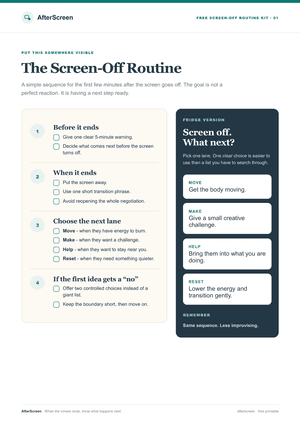
Four steps, used the same way every time.

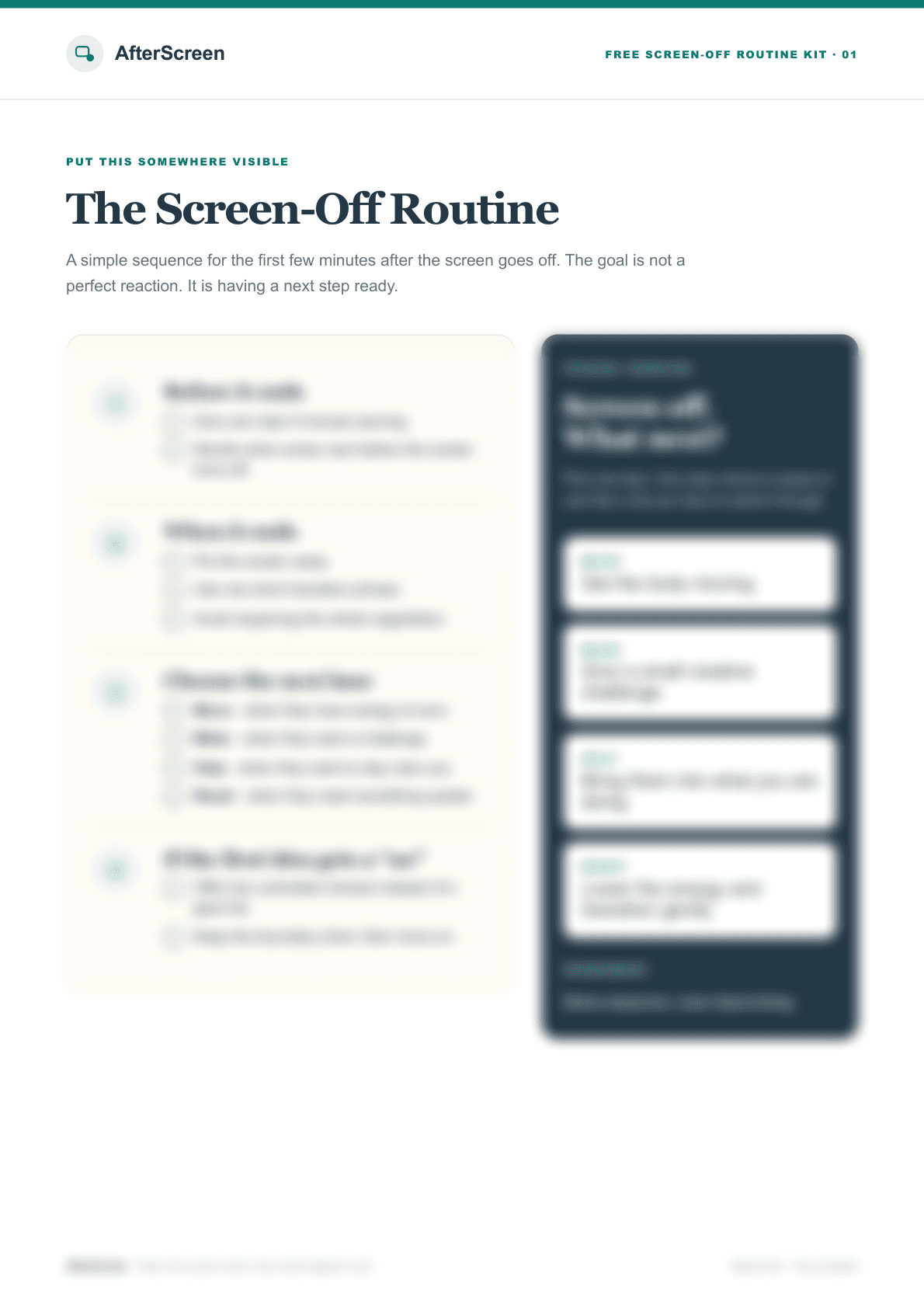
This is page one of the kit. Same sequence every evening, so there is less to improvise.

  1. Before it ends

    Give one clear 5-minute warning. Decide what comes next before the screen turns off.

  2. When it ends

    Put the screen away. Use one short transition phrase. Avoid reopening the whole negotiation.

  3. Choose the next lane

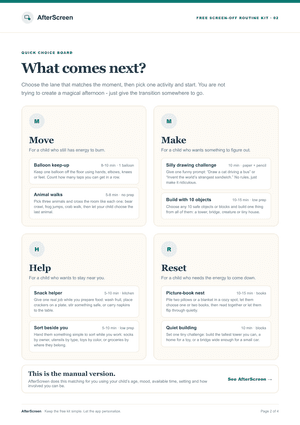
    Move, Make, Help or Reset — whichever matches the child in front of you.

  4. If the first idea gets a “no”

    Offer two controlled choices instead of a giant list. Keep the boundary short, then move on.

What that sounds like in a real kitchen.

Instead of / try. The difference between the two sentences is the whole method.

Situation

The tablet ends and your 5-year-old says: “One more episode!”

Instead of

“Because I said so. You’ve already watched enough today.”

Try

“I know — you were right in the middle of it. That’s the end of that one. Do you want to choose what’s next, or shall I?”

You say what they are feeling before you say what happens now, and the next step arrives in the same breath — so there is no gap to negotiate in.

Situation

The screen goes off and they immediately say: “I’m bored.”

Instead of

Listing five activities and having all five rejected.

Try

“That’s okay — being bored is allowed. Do you want to move about, make something, or come and help me?”

MoveMakeHelpReset

Then offer directions rather than activities.

Situation

The transition is already going badly.

  1. 1

    Stop talking

    A child mid-meltdown can’t take in reasons. Nothing you say in the next thirty seconds will help, and every extra sentence is one more thing to push against.

  2. 2

    Get down to their level

    Kneel or sit. Close enough to touch, and breathe slower than you want to. Standing over someone is an argument all by itself.

  3. 3

    Say it once, kindly

    Same calm voice. The feeling is allowed; the answer doesn’t change. No reasons, no warnings, no consequences. Then stop talking and stay.

  4. 4

    Offer exactly two choices

    Both fine by you. Choosing hands back the control they just lost, which is usually what the fight is actually about.

  5. 5

    Change the room, or give the body a job

    If it’s still climbing, move: kitchen, hallway, front step. Or something heavy — carry the cushions, push the wall, bat a pillow. A different room or a working body interrupts the loop when words can’t.

  6. 6

    Afterwards, say almost nothing

    Sit nearby. Don’t talk about it. When they look at you, smile. You held the line and you stayed — that was the whole job, and it doesn’t have to end tidily.

Exactly what’s in the kit.

All 4 pages, exactly as you will receive them. Print them, or keep them on your phone.

The Screen-Off Routine

The four-step sequence for the first few minutes after the screen goes off, plus a fridge version you can put on the door.

The Screen-Off Routine — page 1 of the free Screen-Off Routine Kit
Get the Free Screen-Off Kit

Free. No card required.

From parents who used it

What changed for them

  • “I used one of the scripts the same evening I downloaded it. Having the words already written out made the transition feel much less stressful.”

    Early-access customerName withheld for privacy
  • “The guide is short enough that I actually read it. No huge parenting manual, just things I could try immediately.”

    Early-access customerName withheld for privacy
  • “I liked that it wasn't telling me to remove screens completely. It was focused on what to do when screen time is already over.”

    Early-access customerName withheld for privacy

Questions parents ask first

Is this about cutting screen time?
No. You decide how much screen time works for your family. The kit is about the few minutes after it ends — what to say, what to offer, and what to do when the first idea gets a no.
Is the kit really free?
Yes. You give us an email address, we send you the kit. Afterwards you will be shown AfterScreen, the optional app that does the choosing for you. The kit is yours either way, and you can ignore the app entirely.
What ages is it for?
Parents and caregivers of children around ages 2–8. What works for a two-year-old and what works for a seven-year-old are very different, so the scripts and activities are organized by age.
Do I need special supplies?
No. The 8 activities use a balloon, paper and a pencil, ten objects you already own, blocks, books, or nothing at all. Two of them need no prep whatsoever.
What exactly is in it?
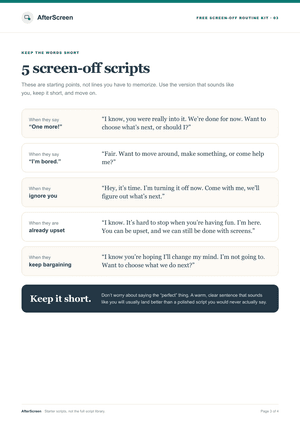
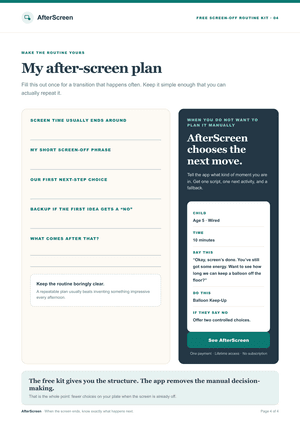
4 printable pages: the screen-off routine with a fridge version, a quick choice board of 8 activities sorted into four lanes, 5 scripts for the things children actually say, and a one-page after-screen plan you fill in once and reuse.
Will my child stop getting upset when the screen goes off?
Sometimes, not always. Your child may still be upset — that is allowed. The goal is not a perfect reaction. It is that you know what happens next, so the moment is shorter and you are not improvising through it.
How does delivery work?
You enter your email on the next page. The kit is emailed to you straight away, and you can also download it directly from the page after that.
“I downloaded it expecting a normal checklist and ended up changing how we handle the end of screen time.”
Early-access customer· Name withheld for privacy

Make tonight’s screen-off moment easier.

The free Screen-Off Routine Kit: what to say, what to offer, and what to do when they say no. Sent to your inbox in about a minute.

Send Me the Free Kit

Free · No card required · No subscription